
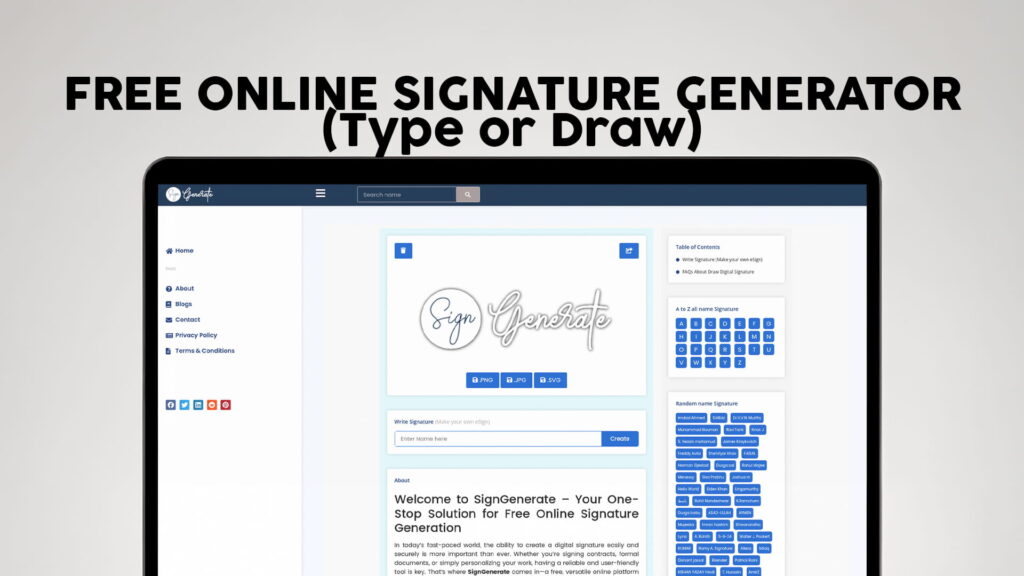
Your signature is more than just your name written on paper. It is your identity, your approval, and your personal mark on every document that matters. In today’s fast-moving digital world, waiting to print, sign, and scan a document is no longer practical. People need fast, reliable, and professional solutions — and that is exactly where SIGN GENERATE comes in.
SIGN GENERATE is a completely free online signature generator that lets you create a beautiful, professional electronic signature in seconds. Whether you want to type your name in an elegant font or draw your signature freehand with your mouse or finger, SIGN GENERATE gives you full control over how your eSign looks — with zero registration required.
Let’s walk through everything you need to know about online signature generators, why they matter, how they work, and why SIGN GENERATE is the smartest choice for anyone who needs a clean, professional signature fast.
What Is an Online Signature Generator?
An online signature generator is a web-based tool that helps you create a digital version of your handwritten signature. Instead of signing a piece of paper and then scanning or photographing it, you simply visit the tool, type or draw your signature, customize it to your liking, and download it as an image file.
This image can then be used in documents, emails, PDFs, contracts, business letters, invoices, and much more. It saves time, reduces paper waste, and gives your digital communications a professional, polished look.
Online signature generators have become incredibly popular because they serve a huge range of people — freelancers, remote workers, students, business owners, executives, creatives, and anyone who regularly works with digital documents.
Why Do You Need a Digital Signature?
You might be wondering — do I really need a digital signature? The short answer is yes, and here’s why.
1. The World Is Going Paperless More and more businesses, governments, and institutions are moving toward paperless processes. Contracts are signed online. Agreements are emailed. Invoices are sent digitally. Having a ready-to-use digital signature means you can respond to these situations instantly, without delays.
2. It Looks Professional Sending a document with a clean, typed or handwritten digital signature looks far more professional than leaving a blank space or typing your name in plain text. It signals that you take your work seriously and pay attention to details.
3. It Saves You Time Printing, signing, scanning, and then emailing a document can take anywhere from 10 to 30 minutes. Creating and adding a digital signature takes less than two minutes. Over the course of a week or a month, that time adds up significantly.
4. It’s Convenient Anywhere Whether you’re working from home, traveling, sitting at a coffee shop, or using your phone, your digital signature is always available. You don’t need a printer, a scanner, or even a pen.
5. It Keeps Records Clean Digital signatures inserted into PDF or Word documents maintain the quality and formatting of the file. There’s no blurry scan, no crooked paper, and no faded ink — just a sharp, clear signature every time.
How SIGN GENERATE Works
SIGN GENERATE is built to be simple, fast, and completely free. You don’t need to create an account, enter your email address, or go through any kind of registration process. You just visit the website and start creating your signature immediately.
Here’s how the process works, step by step:
Step 1 — Choose Your Method SIGN GENERATE gives you two main ways to create your signature. You can either type your name and let the tool convert it into a stylish signature using beautiful fonts, or you can draw your signature directly using your mouse, trackpad, or touchscreen. Both methods produce high-quality results that look natural and professional.
Step 2 — Customize Your Signature Once you’ve typed or drawn your signature, you can customize it. Change the font style to find one that matches your personality. Adjust the size to make it larger or smaller. Choose a color — classic black, dark blue, or anything else that suits your preference. SIGN GENERATE gives you the flexibility to make your signature truly your own.
Step 3 — Preview and Download Before you finalize your signature, you can preview exactly how it will look. Once you’re happy with the result, download it as a transparent PNG image. This means you can place it on top of any document without an awkward white box around it — it looks just like a real ink signature on paper.
Step 4 — Use It Anywhere Your downloaded signature image is ready to use immediately. Insert it into Word documents, PDFs, Google Docs, email footers, contracts, proposals, invoices, and more.
Type Your Signature — A Quick and Elegant Option
The type-your-signature option is perfect for people who want a clean, stylized look without having to draw anything. You simply type your name, and SIGN GENERATE transforms it into a signature using a selection of handwriting-style fonts.
These fonts are carefully chosen to mimic the flowing, natural look of a real handwritten signature. They don’t look like boring computer text — they look like someone actually signed with a pen. The curves, the connected letters, the slight variations in stroke width — all of these details create a signature that feels genuine and personal.
This option is especially popular with:
- Business professionals who want a consistent signature for all their communications
- People who don’t have access to a mouse or stylus for drawing
- Users who want a quick and reliable signature without much effort
- Anyone who prefers a polished, uniform look over a freehand style
With SIGN GENERATE, you can try multiple font styles and compare them side by side until you find the one that best represents you. Some people prefer a bold, flowing script. Others like something lighter and more elegant. The choice is yours.
Draw Your Signature — For a Truly Personal Touch
If you want your digital signature to feel as close to your real-life signature as possible, the draw option is the way to go. Using your mouse on a desktop, your finger on a touchscreen, or a stylus on a tablet, you can draw your signature directly in the signature pad on SIGN GENERATE.
This gives you complete creative freedom. You can replicate your actual signature exactly as you would write it on paper. Every loop, every stroke, every little quirk of your handwriting is captured and preserved.
The drawing canvas is smooth and responsive, so your signature comes out looking fluid and natural, not jagged or mechanical. If your first attempt doesn’t look quite right, you can clear the canvas and try again as many times as you like — there are no limits.
The draw option is particularly well-suited for:
- People who have a distinctive real-life signature they want to digitize
- Artists and creatives who want full expressive control
- Users who sign frequently and want their digital signature to match their physical one
- Business executives and professionals whose signature is a recognized part of their brand
Who Can Benefit from SIGN GENERATE?
The beauty of SIGN GENERATE is that it works for virtually everyone. Let’s look at some of the most common use cases.
Freelancers and Self-Employed Professionals If you’re a freelancer, you’re constantly signing contracts, proposals, and agreements with clients. Having a professional digital signature ready to go means you can close deals faster and present yourself as a credible, organized professional.
Small Business Owners Running a small business involves a mountain of paperwork — vendor agreements, client contracts, employee documents, financial forms. SIGN GENERATE lets you handle all of this digitally, quickly, and without any extra cost.
Students and Academics Students often need to sign application forms, consent documents, scholarship papers, and academic agreements. SIGN GENERATE makes this easy, even without access to a printer or scanner.
Remote Workers For people working from home or in distributed teams, digital tools are everything. A digital signature is an essential part of the remote work toolkit, allowing you to sign HR documents, NDAs, project agreements, and onboarding paperwork without any physical interaction.
Legal and Administrative Professionals Paralegals, administrative assistants, and office managers who handle high volumes of documents can save enormous amounts of time by using a reliable digital signature solution.
Creative Professionals Designers, writers, photographers, and other creatives who send proposals and licensing agreements to clients can add a professional touch to every document they send with a beautiful custom signature.
Everyday Users Even if you don’t run a business, you’ll eventually need to sign something digitally — a rental agreement, a permission slip, an online form. SIGN GENERATE is there whenever you need it, completely free.
Why SIGN GENERATE Stands Out
There are several online signature tools out there, but SIGN GENERATE offers a combination of features that makes it stand out clearly from the crowd.
Completely Free, Always Many signature tools offer a free version but then lock the best features behind a paid subscription. SIGN GENERATE gives you full access to all features without charging you a single penny. There are no hidden fees, no premium tiers, and no surprise charges.
No Registration or Login Required This is one of the biggest advantages of SIGN GENERATE. You don’t need to create an account, verify your email, or remember a password. You visit the site, make your signature, and download it. That’s it. Your time is respected.
Transparent PNG Output Your signature downloads as a transparent PNG, which is the gold standard format for signature images. It means no white background, no ugly box around your name — just a clean, natural-looking signature that sits perfectly on any document.
Works on All Devices SIGN GENERATE is fully responsive and works seamlessly on desktop computers, laptops, tablets, and smartphones. Whether you’re on Windows, Mac, iOS, or Android, the experience is smooth and reliable.
Fast and Lightweight The tool loads quickly and responds immediately. There’s no waiting, no buffering, and no complicated interface to navigate. Within moments of arriving at the site, you can have a finished signature ready to download.
Privacy-Friendly Your personal information is not collected or stored. You type or draw your signature, download it, and the tool doesn’t keep any record of what you created. This makes SIGN GENERATE a trustworthy option for anyone who values privacy.
Common Uses for Your Digital Signature
Once you’ve created your eSign with SIGN GENERATE, the possibilities for how to use it are nearly endless. Here are some of the most common and practical applications:
PDF Documents — Insert your signature image into PDF files using free tools like Adobe Acrobat Reader, Smallpdf, or ILovePDF. This is the most common use case for digital signatures.
Microsoft Word — Add your signature as an image to any Word document. This is ideal for letters, proposals, agreements, and business correspondence.
Google Docs — Upload your signature image to Google Drive and insert it into any Google Doc. Perfect for collaborative remote work environments.
Email Footers — Add your signature to your email footer for a professional, polished look in every email you send.
Invoices — Give your invoices a professional finish by adding a signed signature to the bottom. It builds trust with clients and gives the document a personal touch.
Online Forms — Many online forms now accept uploaded signature images. Your SIGN GENERATE signature is ready for this instantly.
Legal Documents — While electronic signatures have their own legal standards and requirements that vary by country, a clean digital signature image is suitable for many informal and semi-formal agreements.
Creative Projects — Artists, bloggers, and content creators often use personal signatures on their work as a branding element or watermark.
Tips for Creating the Perfect Digital Signature
Here are a few simple tips to help you get the best results when using SIGN GENERATE:
Keep It Legible — A signature doesn’t have to be fully readable, but it should look intentional and controlled. Avoid random scribbles that don’t reflect your identity.
Choose the Right Color — Black and dark navy blue are the most professional and universally accepted colors for signatures. Reserve bright or unusual colors for creative or personal use only.
Match the Size to the Document — A good signature should be proportionate to the document it’s placed on. Not too large that it dominates the page, and not too small that it’s hard to see.
Try Multiple Fonts — If you’re using the type option, don’t just settle for the first font you see. Try several options and pick the one that genuinely feels like “you.”
Practice Before Finalizing — If you’re drawing your signature, take a moment to practice before committing to the final version. Your first attempt may feel unfamiliar since you’re using a mouse or finger instead of a pen.
Save a Copy — Once you download your signature, save it somewhere safe — a dedicated folder on your computer or cloud storage. This way you always have it ready without needing to create it again.
The Future of Signatures Is Digital
The shift toward digital documentation and electronic signing is not a trend — it’s a permanent transformation in the way the world works. Governments are passing laws that recognize electronic signatures as legally valid. Businesses are eliminating paper workflows. Remote work has become standard in many industries.
In this environment, having a reliable, professional digital signature is not just convenient — it’s essential. SIGN GENERATE gives you that tool, completely free, with no strings attached.
Whether you’re a first-time user who’s never created a digital signature before or a busy professional looking for a better, faster solution, SIGN GENERATE is designed with you in mind. The interface is clean and welcoming. The process is intuitive. The results are professional. And the entire experience takes less than two minutes from start to finish.
Start Creating Your Free eSign Today
There’s no reason to delay. You don’t need a subscription. You don’t need an account. You don’t need to download any software or app. All you need is a few moments and a clear idea of how you want your signature to look.
Visit SIGN GENERATE and try both the type and draw options. Experiment with different fonts, colors, and sizes. Preview your signature, tweak it until it’s perfect, and download it in high-quality PNG format — ready to use on any document, anywhere in the world.
Your signature is your mark. Make it count — with SIGN GENERATE.