
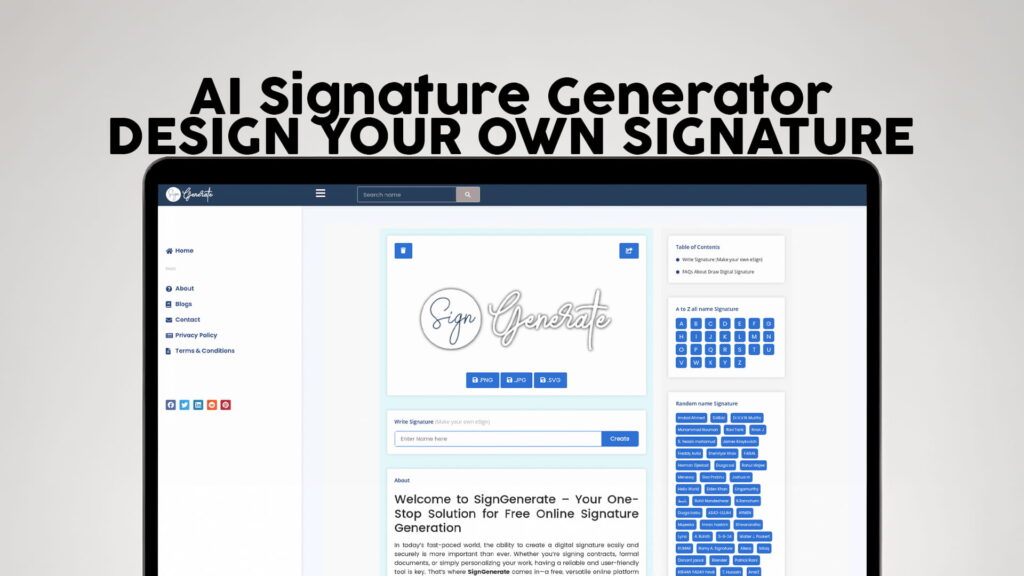
A signature is more than just a scribble at the bottom of a document. It is a mark of your identity. It tells people who you are, how you present yourself, and how serious you are about what you sign. In the old days, people used pen and paper to sign everything — contracts, letters, forms, and certificates. But things have changed. Today, almost everything is digital. Documents are shared online, emails need to be signed, and businesses operate across borders without ever meeting face-to-face.
This is exactly where an AI Signature Generator comes in. It is a tool that helps you create a beautiful, professional-looking signature online — without needing a pen, paper, or even a designer. You type your name, choose a style, and your signature is ready to use.
SIGN GENERATE is one of the best places to do exactly that. It offers a completely free online signature tool that lets you design your own eSign in just a few clicks. No registration. No downloads. No complicated steps. Just visit SIGN GENERATE and start creating your signature right away.
Why Your Signature Matters More Than You Think
Most people do not give much thought to their signature. They just write something quickly and move on. But if you think about it, your signature shows up in many important places — job applications, business contracts, legal documents, email footers, creative projects, and more.
A messy or unclear signature can give the wrong impression. It might make you look unprofessional or careless. On the other hand, a clean, stylish, and well-designed signature can make a strong first impression. It shows that you pay attention to detail and that you take your personal brand seriously.
Whether you are a freelancer, a business owner, a student, or someone who simply wants a better-looking signature for everyday use, designing your own signature online is one of the easiest things you can do to upgrade your professional image.
What Makes SIGN GENERATE Stand Out?
There are many signature tools available online, but SIGN GENERATE is different in several important ways. Here is what makes it a great choice for anyone who wants to create a free signature online:
No Registration Required
One of the biggest frustrations with online tools is having to sign up, verify your email, and go through a long setup process just to use a basic feature. SIGN GENERATE eliminates all of that. You can start creating your signature the moment you land on the website. No account. No password. No waiting.
Completely Free to Use
Many signature generators charge you for downloads or lock the best features behind a paid plan. SIGN GENERATE gives you everything for free. You can design, customize, and download your signature without paying a single rupee or dollar.
Simple and Easy Interface
You do not need to be tech-savvy to use SIGN GENERATE. The tool is designed to be clean and simple. Everything is laid out in a way that makes sense, so even if you have never used an online design tool before, you will be able to figure it out in seconds.
AI-Powered Design
The AI behind SIGN GENERATE helps you create signatures that look like they were crafted by a professional designer. The tool understands how a good signature should look — balanced, stylish, and readable — and it helps you get there quickly.
Multiple Styles and Fonts
Everyone has different tastes. Some people like bold and dramatic signatures. Others prefer something elegant and understated. SIGN GENERATE gives you a range of font styles and design options so you can find a signature that truly feels like yours.
How to Design Your Own Signature Using an AI Tool
Using SIGN GENERATE to create your signature is one of the easiest things you will do today. Here is a simple step-by-step breakdown of how the process works:
Step 1: Visit SIGN GENERATE
Open your browser and go to SIGN GENERATE. You will land directly on the signature creation tool. No pop-ups asking you to register. No banners pushing you to upgrade. Just the tool, ready to go.
Step 2: Type Your Name
Enter your name in the text field. This is the foundation of your signature. You can use your full name, just your first name, your initials, or even a nickname — whatever you want your signature to represent.
Step 3: Choose a Font or Style
This is where the fun begins. SIGN GENERATE offers a variety of styles to choose from. You can browse through different fonts and pick the one that feels right. Want something that looks like it was written with a fountain pen? Or maybe something more modern and clean? You have options.
Step 4: Customize Your Signature
Once you have picked a base style, you can further customize your signature. Adjust the size, the slant, the spacing, or other details to make it look exactly the way you want. Small tweaks can make a big difference in how the final result looks.
Step 5: Preview and Download
Before you finalize your signature, you can preview it to see how it will look on a document or in an email. Once you are happy with it, just hit the download button and save it to your device. It is that simple.
Who Can Benefit From an Online Signature Generator?
The short answer is — almost everyone. But let us look at a few specific groups of people who can really get value out of a tool like SIGN GENERATE:
Freelancers and Independent Professionals
If you work for yourself, you probably sign a lot of contracts, invoices, and proposals. Having a clean digital signature saves you time and makes you look more professional in the eyes of your clients.
Business Owners and Entrepreneurs
Running a business means dealing with paperwork every single day. An AI-generated signature allows you to sign documents quickly and efficiently, without the need to print, sign by hand, and scan everything back.
Students and Job Seekers
When applying for college admissions, internships, or jobs, your resume and cover letter often need to be signed. A well-designed signature adds a professional touch to your application and helps you stand out.
Writers and Content Creators
Authors, bloggers, and content creators often need a signature for book covers, artwork, merchandise, or brand materials. A custom signature created through SIGN GENERATE can serve as a personal logo of sorts.
Corporate Employees
Many professionals need a digital signature for email footers, internal approvals, NDAs, or HR documents. Instead of using a generic typed name, a real-looking signature adds personality and professionalism.
Teachers and Educators
Teachers often need to sign report cards, recommendation letters, certificates, and official communications. A digital signature makes this process faster and easier.
The Difference Between a Digital Signature and an Electronic Signature
People often use these two terms interchangeably, but they are not the same thing. Understanding the difference can help you figure out what you actually need.
An electronic signature (or eSign) is simply a digital version of your handwritten signature. It can be an image of your signature, a typed version of your name in a stylish font, or a drawing made with a mouse or touchscreen. Electronic signatures are used to show agreement or approval on digital documents.
A digital signature, on the other hand, is a more technical concept. It involves cryptographic technology that verifies the identity of the signer and ensures that the document has not been altered after signing. Digital signatures are used in legal and financial contexts where security and verification are critical.
For most everyday purposes — signing PDFs, email footers, creative projects, freelance contracts, and similar uses — an electronic signature created with SIGN GENERATE is perfectly appropriate and widely accepted.
Is It Safe to Use an Online Signature Generator?
This is a question many people ask, and it is a fair one. Your signature is a personal thing, and you want to make sure it is handled safely.
SIGN GENERATE is designed with user simplicity and safety in mind. Since there is no registration required, you do not have to share any personal information like your email address or phone number. The tool focuses on helping you create your signature quickly, without collecting unnecessary data.
When you download your signature from SIGN GENERATE, the image is saved directly to your device. You are in complete control of how you use it. There is no third-party access to your signature file, and there are no hidden terms that claim ownership of what you create.
As with any online tool, it is always a good idea to use your digital signature wisely. Avoid sharing it on public platforms or in places where it could be misused. Keep your signature file somewhere safe on your device.
Tips for Creating a Great Signature Online
Getting a good-looking signature is not difficult, but a few tips can help you make the most of your experience with SIGN GENERATE:
Keep It Simple
The best signatures are often the simplest ones. A clean, flowing design is usually more effective than something overly complex or cluttered. When in doubt, go with something clean and elegant.
Make It Readable
While some people prefer entirely illegible signatures (which actually does have a certain style to it), it is generally a good idea to keep at least part of your signature recognizable. Your initials, your first name, or even just the first letter of your last name can anchor the design.
Match Your Personal Brand
Think about how you want to present yourself. Are you going for something bold and powerful? Or something soft and creative? Your signature should reflect your personality and the image you want to project.
Try Multiple Styles
Do not settle for the first option you see. SIGN GENERATE lets you try different styles quickly, so spend a minute or two exploring your options before committing to one.
Use the Right Format
When you download your signature, make sure you save it in a format that works for your intended use. A PNG file with a transparent background is usually the most versatile, as it can be placed on documents without a white box around it.
The Rise of AI in Everyday Design Tasks
A few years ago, artificial intelligence was mostly associated with science fiction or complex technology used only by large companies. Today, AI is embedded in tools that ordinary people use every single day — from grammar checkers to photo editors to navigation apps.
Signature generation is one of the smaller but meaningful areas where AI has made life easier. In the past, if you wanted a professional-looking digital signature, you had two options: pay a designer or spend hours trying to create something yourself using design software. Neither option was practical for most people.
Now, tools like SIGN GENERATE use AI to do the heavy lifting for you. The technology understands the principles of good signature design — stroke flow, letter spacing, visual balance — and applies them automatically. The result is a signature that looks like it took a professional hours to create, but only took you a few minutes.
This is the real power of AI-powered design tools. They democratize access to quality design, making it available to everyone — not just those with technical skills or big budgets.
How to Use Your Signature Once You Have Created It
Once you have downloaded your signature from SIGN GENERATE, the possibilities are wide open. Here are some of the most common ways people use their digital signatures:
Email Signatures
Adding a visual signature to your email footer instantly makes your messages look more professional. Most email clients, like Gmail and Outlook, allow you to insert an image into your signature block. Just upload your SIGN GENERATE signature, and you are done.
PDF Documents
You can insert your signature image into PDF files using tools like Adobe Acrobat, PDFescape, or even Google Docs. This is useful for signing contracts, agreements, offer letters, and other formal documents.
Creative Projects
Artists, photographers, and designers often add their signatures to their work as a way of marking ownership. A custom signature created with SIGN GENERATE can be watermarked onto images or embedded in digital artwork.
Social Media and Websites
Some professionals add their signature to their website’s about page or use it as part of their branding on social media profiles. It adds a personal, human touch to what might otherwise be a generic online presence.
Printed Materials
Even if you primarily work digitally, there are times when you need to print something. Your SIGN GENERATE signature can be inserted into Word documents, presentations, certificates, or any other printable material before you send it to the printer.
Why Free Tools Like SIGN GENERATE Are Changing the Game
Not long ago, access to professional design tools required expensive software subscriptions or the help of a trained designer. For small businesses, students, and individuals working on a budget, this created a real barrier.
Free online tools like SIGN GENERATE are breaking down those barriers. By offering a powerful, AI-driven signature generator at zero cost — and without even requiring users to create an account — SIGN GENERATE puts professional-quality design in the hands of anyone with an internet connection.
This shift matters. It means a student in Karachi, a freelancer in London, and a small business owner in New York all have access to the same quality tools. The playing field is leveled, and everyone gets to present themselves with the same level of professionalism, regardless of their budget.
Yes, SIGN GENERATE is 100% free to use. You can create, customize, and download your signature without paying anything. There are no hidden charges, no premium upgrades required, and no subscription fees involved. Simply visit SIGN GENERATE, design your signature, and download it instantly at zero cost.
No, absolutely not. SIGN GENERATE requires no registration whatsoever. You do not need to provide your email address, phone number, or any personal information. Just open the website and start designing your signature immediately — it is that straightforward and hassle-free.
Yes, in most cases an electronically generated signature is widely accepted for everyday professional and business documents such as contracts, invoices, agreements, and forms. However, for highly sensitive legal or financial transactions that specifically require a certified digital signature with cryptographic verification, it is always recommended to check the requirements of your specific country or organization beforehand.
SIGN GENERATE allows you to download your signature in a standard image format, with PNG being the most recommended option. A PNG file with a transparent background is the most versatile format because it can be cleanly placed on any document, email footer, or digital artwork without an unwanted white background box appearing around it.
Absolutely. SIGN GENERATE lets you experiment with as many styles, fonts, and designs as you like without any restrictions. You can create one signature for your professional emails, another for business contracts, and a completely different one for your creative projects — all for free and without ever needing to log into an account.
Final Thoughts: Your Signature, Your Identity
Your signature is one of the most personal things about you. It has been used for centuries as a mark of identity, authority, and agreement. In an increasingly digital world, having a clean, professional, and well-designed electronic signature is more important than ever.
SIGN GENERATE makes it easier than ever to create one. It is free, fast, simple, and powered by smart AI technology that helps you design a signature that truly represents you. Whether you need it for professional documents, creative projects, email communications, or personal use, SIGN GENERATE has everything you need to get the job done right.
There is no reason to keep signing with a messy typed name or an awkward drawing made with a computer mouse. Take a few minutes, visit SIGN GENERATE, and create a signature you will actually be proud to use. It costs you nothing, takes almost no time, and makes a real difference in how you present yourself to the world.
Your signature is your mark. Make it count.